 NRS Invoice Gateway
Receive Inbound Invoice Webhooks
Configure the parent webhook, process inbound-invoice events idempotently, and reconcile delivery safely.
When inbound receipt is enabled for your environment, NRS Invoice Gateway sends one partner event type, invoice.inbound_received. Duplo sends it after it has received an inbound NRS invoice addressed to one of your represented businesses and stored that invoice, so the invoice is already readable through the Gateway API by the time the event reaches you.
Inbound receipt requires environment certification
This page documents the implemented flow; it is not confirmation that the NRS callback is enabled in your test or live environment. Duplo must first certify the trusted-edge path, an independent NRS sender-authentication or authoritative source restriction, callback timing and crash recovery, and the multi-instance retry path. If Duplo has not confirmed those controls, keep inbound receipt outside your launch scope and do not expect these events. The raw inbound download and acknowledgement API routes remain separately blocked as documented in Supported NRS endpoints.
Every event goes to a single URL saved on the API credential of your top-level business in Duplo Dashboard. There is no per-represented-business URL, so read gatewaySubBusinessId in each event to tell which represented business the invoice was addressed to.
Canonical ID migration
Newly created events contain the selected NRS business ID as
gatewaySubBusinessId. A delivery that was already queued before the
canonical-ID migration can still contain the historical Duplo UUID unchanged.
Keep your temporary old-UUID-to-canonical-ID mapping until those queued
deliveries drain, or resolve a known old UUID through GET /sub-businesses/{oldUuid} before downstream processing. Do not treat an
arbitrary UUID as authorized: it must resolve under the same parent, hostname,
test/live state, and active represented-business mapping.
What this webhook is, and is not
invoice.inbound_received reports an invoice that someone else issued to one
of your represented businesses. It is never sent for work you started: a
Pass-through sign, a Stored sign, a billing charge, and a transmission each
report their own result. Keep reading the synchronous response for
Pass-through calls, and keep polling GET /invoices/{invoiceId} for Stored invoices.
Delivery flow
Notify
NRS tells Duplo that an inbound invoice with a given IRN is available.
Store
Duplo resolves the test or live state and the represented business, downloads the invoice, and stores it.
Enqueue
Duplo records the event for delivery in the same transaction that stores the invoice, so no event is queued for an invoice you cannot yet read.
Deliver
Duplo POSTs the event to your URL. Because a delivery can be missed, your application also reconciles against the invoice API.
Building your webhook endpoint
Your webhook endpoint should be accessible on a dedicated public HTTPS URL, for example:
https://api.example.com/webhooks/duplo/invoice-gateway/<unguessable-route-secret>Your endpoint should:
- Accept
GETand return any 2xx response. Duplo sends aGETas its reachability check each time you save the URL in Duplo Dashboard. - Accept
POSTwith a JSON body for real deliveries. - Persist the delivery ID and event body before acknowledging the delivery.
- Return a 2xx response quickly, then do expensive work asynchronously.
- Use canonical HTTPS on the default port, without embedded credentials or a URL fragment. Surrounding whitespace, control characters, backslashes, malformed hostnames, trailing-dot hostnames, and non-default ports are rejected.
- Be reachable over public DNS. Duplo resolves all current A/AAAA results and rejects the target if any result is private, loopback, link-local, reserved, malformed, or otherwise non-public.
- Avoid HTTP redirects. Neither the reachability check nor a delivery follows them, so a URL that redirects is recorded as unreachable or leaves the delivery pending for retry.
- Return a small response. Duplo ignores the body, disables response decompression, and caps the response at 64 KiB.
Duplo currently allows five seconds for the reachability check and each delivery, but your receiver should return much faster. Do not call NRS, generate PDFs, send email, or run long database workflows before you return your 2xx.
Adding the webhook URL to your dashboard
In Duplo Dashboard, open Settings > Developer API, scroll to Webhook, enter your publicly accessible webhook URL, and click Save.
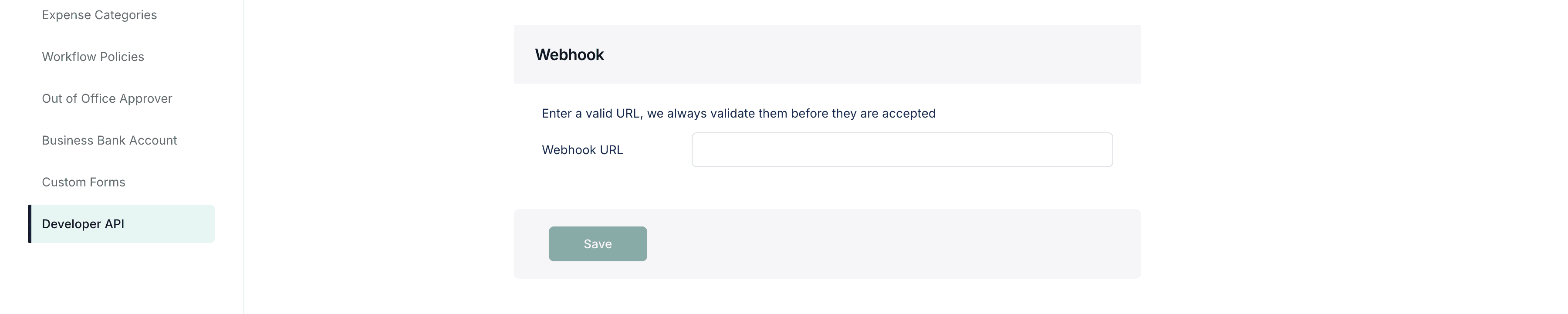
When you click Save, Duplo applies the URL and DNS policy above, pins one of the validated public addresses for that request, makes a non-redirecting GET, and waits for a 2xx response. It stores the URL only if that check succeeds. DNS is checked and pinned again immediately before every later POST; passing this initial check never grants a hostname permanent trust.
The setting is stored on the credential for the state your business is currently in, test or live, so save and verify it again after you move from test to live. Webhook readiness is one section of the go-live checklist, which covers that move alongside the rest of your integration.
Parsing webhook events
The structure of an invoice.inbound_received event is below. The delivery ID arrives as a request header, and everything else as a JSON body:
{
  "event": "invoice.inbound_received",
  "invoiceId": "66666666-6666-4666-8666-666666666666",
  "invoiceReferenceNumber": "INBOUND01-2A3A045D-20260818",
  "gatewaySubBusinessId": "nrs-business-demo",
  "businessState": "test"
}
Each field does a specific job in your receiver:
| Field | Use |
|---|---|
event | Dispatch on the event type. invoice.inbound_received is the only value today; store or ignore any other value rather than failing |
invoiceId | Read the stored invoice through the Gateway API and correlate later work |
invoiceReferenceNumber | Match the invoice against your own record of the IRN. Do not use it to decide which represented business the invoice belongs to |
gatewaySubBusinessId | Identify the represented business the invoice was addressed to |
businessState | Either test or live, always matching the credential this URL was saved on. Route the event to the matching queues, data stores, and downstream actions |
x-duplo-delivery-id | Deduplicate repeat deliveries of the same event |
Before enqueueing anything, check that invoiceId and x-duplo-delivery-id are well-formed UUIDs, that gatewaySubBusinessId is either the non-empty opaque NRS business ID in your state-scoped mapping or a known pre-migration UUID alias that resolves to it, that event is exactly invoice.inbound_received, and that businessState is the state this receiver handles. Canonicalize a known legacy alias before downstream processing. Preserve JSON fields you do not recognize so later additions to the payload do not break your receiver.
An event always carries the state of the credential its URL was saved on, so a live endpoint never receives test events and a test endpoint never receives live ones. Check businessState anyway. The comparison is cheap, and it catches the configuration mistake this guarantee cannot prevent: a deployment holding the wrong environment's credentials.
Deduplicating and acknowledging deliveries
Parsing tells you what arrived. The next question is whether you have already seen it, because the same event can reach you more than once. Put a uniqueness constraint on the delivery ID, then handle each delivery in this order:
- Read
x-duplo-delivery-id. Return400if it is missing or malformed. - Validate the event shape, the event name, and
businessState. - In one transaction, insert
{deliveryId, event, invoiceId, receivedAt, rawBodyHash}into an inbox table whosedeliveryIdcolumn is unique. If the insert succeeds, write the queue or outbox record in that same transaction. If it fails as a duplicate, write nothing. - Return
204in both cases. A duplicate delivery is not an error. - Process the queued work after you have responded.
If you cannot persist a delivery, for example while your database is unavailable, return a non-2xx status. Never acknowledge an event you did not store.
const EXPECTED_BUSINESS_STATE = "test"; // the state this receiver handles

async function receiveDuploWebhook(request: Request): Promise<Response> {
  const deliveryId = request.headers.get("x-duplo-delivery-id");
  const event = await request.json();

  if (
    !deliveryId ||
    event.event !== "invoice.inbound_received" ||
    event.businessState !== EXPECTED_BUSINESS_STATE
  ) {
    return new Response("invalid webhook", { status: 400 });
  }

  await database.transaction(async (tx) => {
    const inserted = await tx.webhookInbox.insertOnce(deliveryId, event);
    if (inserted) await tx.jobs.enqueue("handle-inbound-invoice", event);
  });

  return new Response(null, { status: 204 });
}
This is illustrative pseudocode. Implement insertOnce with a real database uniqueness constraint on deliveryId, not an in-memory set, so the check survives a restart and holds across every instance of your service.
Verifying events
Treat the payload as an untrusted signal that an invoice may exist. The Gateway API, not the POST body, is the source of truth about the invoice. Read the invoice back with your API key and match every identifier and state before acting. A forged event naming a missing invoice then resolves to nothing, while a forged or repeated event naming a real invoice cannot substitute attacker-controlled invoice content.
Deliveries are not signed. Use x-duplo-delivery-id only as a delivery identifier for deduplication, never as proof of origin or payload integrity. An authenticated invoice read proves the returned invoice record, but it does not prove who sent the webhook request; a forged event that names a real invoice could still trigger duplicate work if your application skips its inbox and state-transition checks. This read-back pattern materially reduces risk, but it is not equivalent to a per-partner signature and replay-window contract. Read the authoritative invoice covers the call and fields to match.
Build the endpoint around that pattern:
- Keep every irreversible step behind the authenticated read, including accounting entries, payments, and any document you pass to a represented client. No request arriving at your endpoint should be able to trigger one on its own.
- Serve the endpoint over TLS, and give its path a long random segment that you store as a secret alongside your API keys, so the URL is not something an outsider can guess or find in a log.
- Restrict by network only against egress ranges Duplo has given you for your environment, rather than addresses inferred from traffic you observe.
- Rotate the URL if it is ever exposed: save a new secret path in Duplo Dashboard, then stop serving the old one.
Read the authoritative invoice
An event tells you that an invoice exists. Read the invoice itself before acting on it:
curl \
  --url https://acme.invoice.tryduplo.com/invoices/66666666-6666-4666-8666-666666666666 \
  --header 'x-api-key: pk_test_replace_with_your_key'
The route is scoped to your top-level business, so your x-api-key is the only header it needs. Do not send x-sub-business-id here, even though the invoice belongs to a represented business; that header is for the invoice operations you perform on behalf of one.
Before you create accounting entries or pass invoice content to a represented client, check that the response's invoice ID, invoiceReferenceNumber, gatewaySubBusinessId, and businessState match the event and that direction is inbound. Apply an allowed lifecycle transition exactly once in your own database. If any value or transition differs, stop and investigate instead of processing the invoice.
Delivery retries
Duplo records the delivery intent before it makes any network call, and it retries failed deliveries internally with a dead-letter path for deliveries that keep failing. Immediately before a retry, the worker re-resolves the current represented-business ownership, parent, domain/state/mode snapshot, and active parent webhook URL, then renews its database claim with a compare-and-set. A stale worker cannot POST after another instance has taken over, and a URL rotation is honored instead of continuing to use the old destination.
Every immediate or retried POST repeats the full URL/DNS policy, pins the selected public address while retaining the hostname for TLS, disables ambient HTTP proxies and redirects, and redacts the callback path/query and HTTP client error object from Duplo delivery-failure logs. Retry counts and schedules are environment configuration rather than part of the customer contract, so treat redelivery as best effort: a delivery that exhausts retries may never arrive. Never build a flow in which an inbound invoice can only be discovered from a retried webhook.
What follows from that:
- The same event can arrive more than once, so your receiver must stay idempotent across deploys and database failovers.
- A 2xx response tells Duplo you have taken responsibility for the event. Duplo does not wait for your downstream workflow to finish.
- Reconcile inbound invoices on a schedule through the authenticated
GET /invoicesandGET /invoices/{invoiceId}routes on your Gateway host, even while webhook delivery looks healthy.
If your endpoint was unavailable, restore it, confirm reachability in Duplo Dashboard, and reconcile through those same two routes. GET /invoices includes both inbound and outbound Gateway-owned invoices for the authenticated parent. It currently has no direction or gatewaySubBusinessId query filter, so paginate the complete result and select records whose direction is inbound and whose gatewaySubBusinessId matches the represented business in your own mapping. Use GET /invoices/{invoiceId} for the authoritative detail referenced by an event. Duplo exposes no customer-facing redrive or delivery-status endpoint today, so contact Duplo Support if you need a specific delivery investigated.
How is this guide?