 NRS Invoice Gateway
Receive Inbound Invoice Webhooks
Configure the parent webhook, process inbound-invoice events idempotently, and reconcile delivery safely.
When inbound receipt is enabled for your environment, NRS Invoice Gateway sends one partner event type, INVOICE_INBOUND_RECEIVED. Duplo sends it after it has received an inbound NRS invoice addressed to one of your represented businesses and stored that invoice, so the invoice is already readable through the Gateway API by the time the event reaches you.
Inbound receipt needs Duplo's confirmation
This page documents how the flow works; it is not confirmation that inbound receipt is enabled in your test or live environment. Until Duplo confirms that it is enabled for your environment, keep inbound receipt outside your launch scope and do not expect these events. The raw inbound download and acknowledgement API routes remain separately blocked as documented in Supported NRS endpoints.
Every event goes to a single URL saved for your top-level business in Duplo Dashboard. There is no per-represented-business URL, so read gatewaySubBusinessId in each event to tell which represented business the invoice was addressed to.
Canonical ID migration
Newly created events contain the selected NRS business ID as
gatewaySubBusinessId. A delivery that was already queued before the
canonical-ID migration can still contain the historical Duplo UUID unchanged.
Keep your temporary old-UUID-to-canonical-ID mapping until those queued
deliveries drain, or resolve a known old UUID through GET /sub-businesses/{oldUuid} before downstream processing. Do not treat an
arbitrary UUID as authorized: it must resolve under the same parent, hostname,
test/live state, and active represented-business mapping.
What this webhook is, and is not
INVOICE_INBOUND_RECEIVED reports an invoice that someone else issued to one
of your represented businesses. It is never sent for work you started: a
Pass-through sign, a Stored sign, a billing charge, and a transmission each
report their own result. Keep reading the synchronous response for
Pass-through calls, and keep polling GET /invoices/{invoiceId} for Stored invoices.
Delivery flow
Notify
NRS tells Duplo that an inbound invoice with a given IRN is available.
Store
Duplo resolves the test or live state and the represented business, downloads the invoice, and stores it.
Enqueue
Duplo records the event for delivery in the same transaction that stores the invoice, so no event is queued for an invoice you cannot yet read.
Deliver
Duplo POSTs the event to your URL. Because a delivery can be missed, your application also reconciles against the invoice API.
Building your webhook endpoint
Your webhook endpoint should be accessible on a dedicated public HTTPS URL, for example:
https://api.example.com/webhooks/duplo/invoice-gateway/<unguessable-route-secret>Your endpoint should:
- Accept
GETand return any 2xx response. Duplo sends aGETas its reachability check each time you save the URL in Duplo Dashboard. - Accept
POSTwith a JSON body for real deliveries. - Persist the delivery ID and event body before acknowledging the delivery.
- Return a 2xx response quickly, then do expensive work asynchronously.
- Use canonical HTTPS on the default port, without embedded credentials or a URL fragment. Surrounding whitespace, control characters, backslashes, malformed hostnames, trailing-dot hostnames, and non-default ports are rejected.
- Be reachable over public DNS. Duplo resolves all current A/AAAA results and rejects the target if any result is private, loopback, link-local, reserved, malformed, or otherwise non-public.
- Avoid HTTP redirects. Neither the reachability check nor a delivery follows them, so a URL that redirects is recorded as unreachable or leaves the delivery pending for retry.
- Return a small response. Duplo ignores the body, disables response decompression, and caps the response at 64 KiB.
Duplo currently allows five seconds for the reachability check and each delivery, but your receiver should return much faster. Do not call NRS, generate PDFs, send email, or run long database workflows before you return your 2xx.
Adding the webhook URL to your dashboard
In Duplo Dashboard, open Settings > Developer API, scroll to Webhook, enter your publicly accessible webhook URL, and click Save.
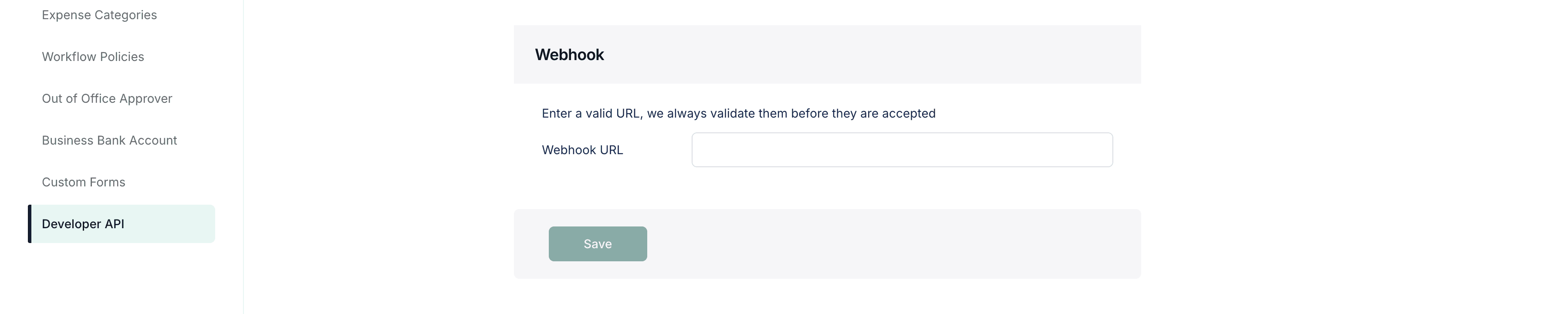
When you click Save, Duplo applies the URL and DNS policy above, pins one of the validated public addresses for that request, makes a non-redirecting GET, and waits for a 2xx response. It stores the URL only if that check succeeds. DNS is checked and pinned again immediately before every later POST; passing this initial check never grants a hostname permanent trust.
Test and live each keep their own URL, and saving sets the one for the state your business is in at the time, so save and verify it again after you move from test to live. Webhook readiness is one section of the go-live checklist, which covers that move alongside the rest of your integration.
Parsing webhook events
Every event is a JSON POST with the same envelope:
{
  "event_type": "INVOICE_INBOUND_RECEIVED",
  "data": {
    "invoiceId": "66666666-6666-4666-8666-666666666666",
    "invoiceReferenceNumber": "INBOUND01-2A3A045D-20260818",
    "invoiceNumber": null,
    "status": "signed",
    "nrsStatus": "signed",
    "transmissionStatus": "not_sent",
    "environment": "sandbox",
    "occurredAt": "2026-08-18T10:00:00.000Z",
    "gatewaySubBusinessId": "nrs-business-demo"
  }
}
Each field does a specific job in your receiver:
| Field | Use |
|---|---|
event_type | Dispatch on the event type. Acknowledge any value other than INVOICE_INBOUND_RECEIVED with a 2xx and ignore it rather than failing the delivery |
data.invoiceId | Read the stored invoice through the Gateway API and correlate later work |
data.invoiceReferenceNumber | Match the invoice against your own record of the IRN. Do not use it to decide which represented business the invoice belongs to |
data.gatewaySubBusinessId | Identify the represented business the invoice was addressed to |
data.environment | sandbox for test or live for live, always matching the state this URL was saved for. Route the event to the matching queues, data stores, and downstream actions |
data.occurredAt | When Duplo stored the invoice, in UTC |
The other data fields are a snapshot of the invoice when the event was queued. Read the invoice back for its current state.
Each request also carries these headers:
| Header | Value |
|---|---|
x-duplo-delivery-id | Unique per event. Retries of the same event reuse it, so deduplicate on it |
x-duplo-event | The event name, the same as the body's event_type |
x-duplo-timestamp | Unix time in seconds when this attempt was signed |
x-duplo-signature | One or more v1=<hex> signatures, separated by commas |
Before enqueueing anything, check that data.invoiceId and x-duplo-delivery-id are well-formed UUIDs, that data.gatewaySubBusinessId is either the non-empty opaque NRS business ID in your state-scoped mapping or a known pre-migration UUID alias that resolves to it, and that data.environment is the environment this receiver handles. Canonicalize a known legacy alias before downstream processing. Preserve JSON fields you do not recognize so later additions to the payload do not break your receiver.
An event always carries the state its URL was saved for, so a live endpoint never receives sandbox events and a test endpoint never receives live ones. Check data.environment anyway. The comparison is cheap, and it catches the configuration mistake this guarantee cannot prevent: a deployment holding the wrong environment's credentials.
Deduplicating and acknowledging deliveries
Parsing tells you what arrived. The next question is whether you have already seen it, because the same event can reach you more than once. Put a uniqueness constraint on the delivery ID, then handle each delivery in this order:
- Verify the signature against the raw request body. Return
401if nov1value matches. - Read
x-duplo-delivery-id. Return400if it is missing or malformed. - If
event_typeis notINVOICE_INBOUND_RECEIVED, return204without processing it. Otherwise validate the event shape anddata.environment. - In one transaction, insert
{deliveryId, event, invoiceId, receivedAt, rawBodyHash}into an inbox table whosedeliveryIdcolumn is unique. If the insert succeeds, write the queue or outbox record in that same transaction. If it fails as a duplicate, write nothing. - Return
204in both cases. A duplicate delivery is not an error. - Process the queued work after you have responded.
If you cannot persist a delivery, for example while your database is unavailable, return a non-2xx status. Never acknowledge an event you did not store.
import { createHmac, timingSafeEqual } from "node:crypto";

const EXPECTED_ENVIRONMENT = "sandbox"; // the environment this receiver handles
const SECRET_KEY = process.env.DUPLO_SECRET_KEY!; // sk_test_… for sandbox, sk_live_… for live

function hasValidSignature(rawBody: string, headers: Headers): boolean {
  const deliveryId = headers.get("x-duplo-delivery-id");
  const timestamp = Number(headers.get("x-duplo-timestamp"));
  if (!deliveryId || !Number.isFinite(timestamp)) return false;
  if (Math.abs(Date.now() / 1000 - timestamp) > 300) return false;

  const expected = createHmac("sha256", SECRET_KEY)
    .update(`${deliveryId}.${timestamp}.${rawBody}`)
    .digest();

  return (headers.get("x-duplo-signature") ?? "")
    .split(",")
    .map((part) => Buffer.from(part.trim().replace(/^v1=/, ""), "hex"))
    .some(
      (given) =>
        given.length === expected.length && timingSafeEqual(given, expected),
    );
}

async function receiveDuploWebhook(request: Request): Promise<Response> {
  const rawBody = await request.text(); // verify before parsing
  if (!hasValidSignature(rawBody, request.headers)) {
    return new Response("invalid signature", { status: 401 });
  }

  const deliveryId = request.headers.get("x-duplo-delivery-id")!;
  const event = JSON.parse(rawBody);

  if (event.event_type !== "INVOICE_INBOUND_RECEIVED") {
    return new Response(null, { status: 204 }); // not an event this receiver handles
  }
  if (event.data?.environment !== EXPECTED_ENVIRONMENT) {
    return new Response("invalid webhook", { status: 400 });
  }

  await database.transaction(async (tx) => {
    const inserted = await tx.webhookInbox.insertOnce(deliveryId, event);
    if (inserted) await tx.jobs.enqueue("handle-inbound-invoice", event);
  });

  return new Response(null, { status: 204 });
}
This is illustrative code. Implement insertOnce with a real database uniqueness constraint on deliveryId, not an in-memory set, so the check survives a restart and holds across every instance of your service.
Verifying events
Every delivery is signed. Check the signature before you trust the body, then read the invoice back through the Gateway API before you act on it.
Checking the signature
Each v1 value in x-duplo-signature is an HMAC-SHA256 of <x-duplo-delivery-id>.<x-duplo-timestamp>.<raw request body>, keyed with a secret API key of your top-level business for the event's data.environment: sk_test_… for sandbox and sk_live_… for live. You find it on the Developer API page in Duplo Dashboard. The public key you send as x-api-key is never used for signing. Keep the secret key on your server: you use it to verify deliveries, and you never send it in a request.
Duplo signs with every active secret key in that state, plus any key revoked or deactivated in the last 24 hours, and sends one v1 value per key. A delivery therefore verifies with whichever key you hold, including while you rotate keys. Accept it if any v1 value matches.
- Read the raw request bytes. Parsing the JSON and serializing it again changes them.
- Reject the request if
x-duplo-timestampis more than 5 minutes from your clock. - Compute the HMAC and compare it with each
v1value in constant time.
hasValidSignature in the receiver above follows these steps. The mistakes that most often break verification are parsing the JSON before verifying it, using the other state's secret key or the public key, checking only the first v1 value, and comparing with == or === instead of a constant-time function.
Treating the event as a signal
A valid signature shows that Duplo sent the delivery and that the body was not changed. The Gateway API is still the source of truth about the invoice, because a signed event can be a retry of an older one. Read the invoice back with your API key and match every identifier and state before acting, as Read the authoritative invoice describes.
Build the endpoint around that pattern:
- Keep every irreversible step behind the authenticated read, including accounting entries, payments, and any document you pass to a represented client. No request arriving at your endpoint should be able to trigger one on its own.
- Serve the endpoint over TLS, and give its path a long random segment that you store as a secret alongside your API keys, so the URL is not something an outsider can guess or find in a log.
- Restrict by network only against egress ranges Duplo has given you for your environment, rather than addresses inferred from traffic you observe.
- Rotate the URL if it is ever exposed: save a new secret path in Duplo Dashboard, then stop serving the old one.
Read the authoritative invoice
An event tells you that an invoice exists. Read the invoice itself before acting on it:
curl \
  --url https://acme.invoice.tryduplo.com/invoices/66666666-6666-4666-8666-666666666666 \
  --header 'x-api-key: pk_test_replace_with_your_key'
The route is scoped to your top-level business, so your x-api-key is the only header it needs. Do not send x-sub-business-id here, even though the invoice belongs to a represented business; that header is for the invoice operations you perform on behalf of one.
Before you create accounting entries or pass invoice content to a represented client, check that the response's invoice ID, invoiceReferenceNumber, and gatewaySubBusinessId match the event, that its businessState matches the event's data.environment (test for sandbox, live for live), and that direction is inbound. Apply an allowed lifecycle transition exactly once in your own database. If any value or transition differs, stop and investigate instead of processing the invoice.
Delivery retries
Duplo records each delivery before it makes any network call, and it retries failed deliveries. Immediately before a retry, Duplo checks the represented business's current ownership and your current webhook URL, so a URL change applies to pending retries instead of the old destination receiving them.
Every first attempt and retry applies the full URL and DNS rules above and does not follow redirects. Duplo redacts your URL's path and query from its delivery logs. Retry counts and schedules are not part of the customer contract, so treat redelivery as best effort: a delivery that exhausts retries may never arrive. Never build a flow in which an inbound invoice can only be discovered from a retried webhook.
What follows from that:
- The same event can arrive more than once, so your receiver must stay idempotent across deploys and database failovers.
- A 2xx response tells Duplo you have taken responsibility for the event. Duplo does not wait for your downstream workflow to finish.
- Reconcile inbound invoices on a schedule through the authenticated
GET /invoicesandGET /invoices/{invoiceId}routes on your Gateway host, even while webhook delivery looks healthy.
If your endpoint was unavailable, restore it, confirm reachability in Duplo Dashboard, and reconcile through those same two routes. GET /invoices includes both inbound and outbound Gateway-owned invoices for the authenticated parent. It currently has no direction or gatewaySubBusinessId query filter, so paginate the complete result and select records whose direction is inbound and whose gatewaySubBusinessId matches the represented business in your own mapping. Use GET /invoices/{invoiceId} for the authoritative detail referenced by an event. Duplo exposes no customer-facing redrive or delivery-status endpoint today, so contact Duplo Support if you need a specific delivery investigated.
How is this guide?
Last updated on