How to sign up
Create your Duplo account.
Duplo Dashboard · How-to guides · Nigeria only · Last updated
Welcome to Duplo! We're excited to have you.
Whether you're here to manage your business payments, streamline operations, or collaborate with your team, signing up is a breeze. This guide will walk you through the simple steps to create your Duplo account. In just a few minutes, you'll be all set to explore our powerful features and start making your work life easier.
Let's get you started.
Steps
-
Our sales team will provide you with the signup link
-
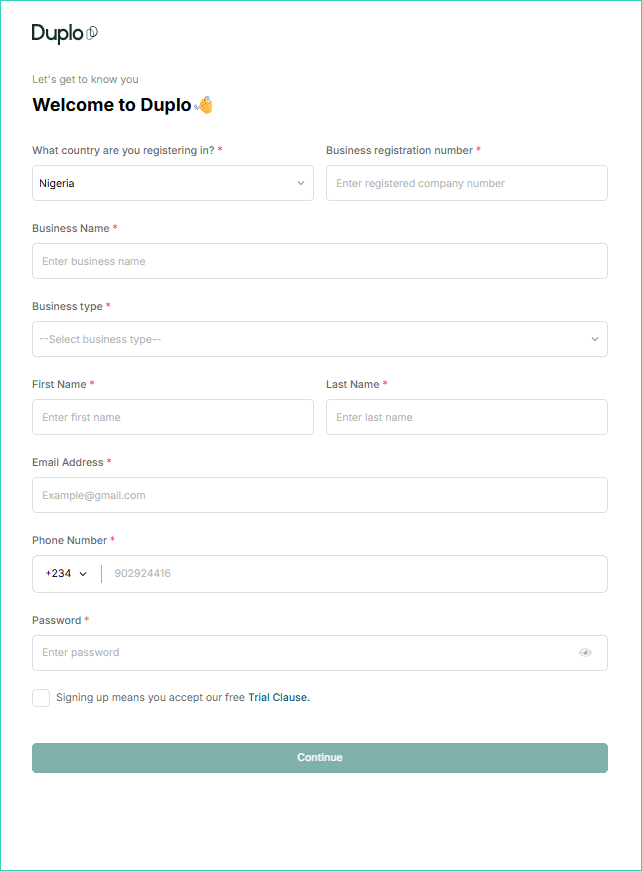
It will redirect you to this page as shown below:
-
Fill in the required fields and click Continue.
-
You'll receive an OTP (One-Time Password) in your email inbox to complete the process.
-
Input the OTP from your email. It is important you input the OTP to verify your email, it expires in 10 minutes.
Congratulations! You've completed the sign-up and verification process You can now sign in to your Duplo account.
Frequently asked questions
Was this article helpful?
Related articles
Still need help?
Send a ticket to our support team and they will get back to you.