How to add a new business or sub-location
Add another business or a sub-location to your Duplo account.
Duplo Dashboard · How-to guides · Nigeria only · Last updated
Adding new entities to your account helps you seamlessly manage finances across all your businesses from one centralised platform. Whether you need to create a new business or add a new sub-business location, this guide will walk you through the simple steps required to manage and link that entity to your Duplo account.
Steps
-
Log in to the Dashboard
-
Click on the Business details drop-down on the Menu
-
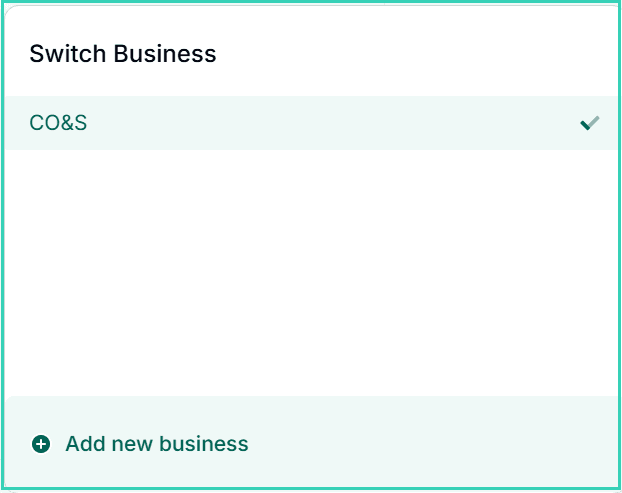
The following drop-down will appear as shown below. Click "Add New Business"
-
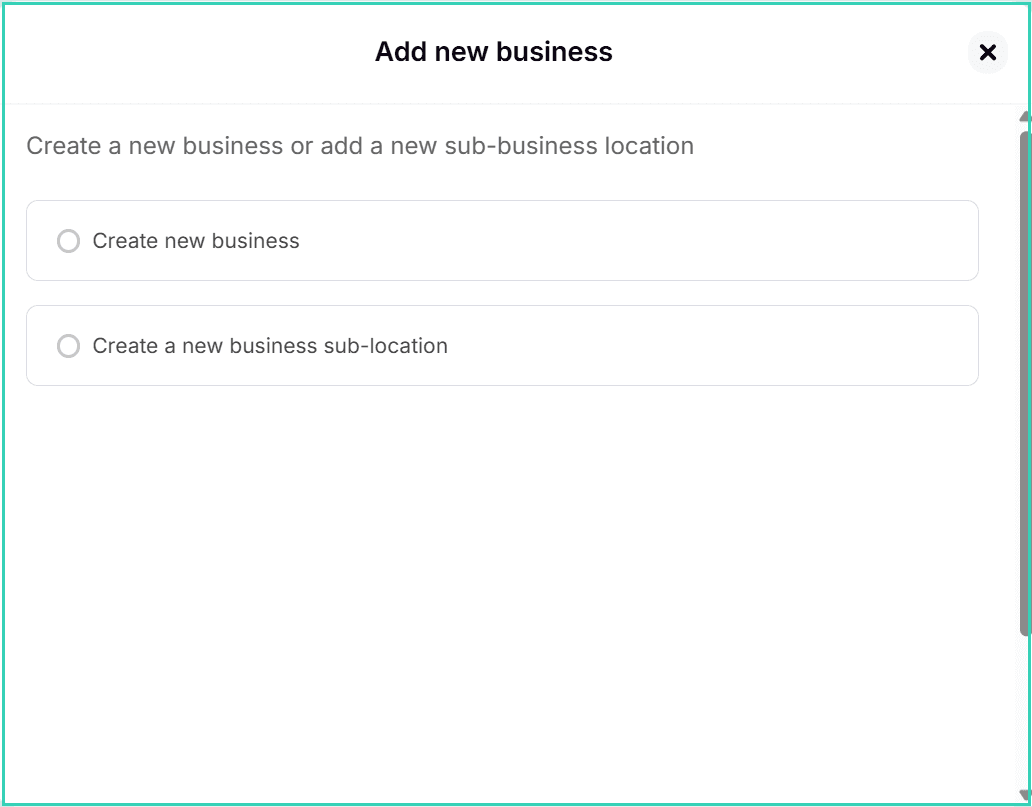
You will get a view to choose the action of your choice. As shown below, select either:
-
Create new business - This is a new business that would require a different set of compliance documents, so it would not inherit your existing business compliance status
-
Create a new business sub-location- This is a different location under your existing business; it would inherit your existing compliance status.
-
-
Fill in all the required details for your chosen action
-
Click "Create" to complete the action.
-
You will get a success modal indicating that your new business or sub-business has been successfully added.
That's it! You have successfully added a new business or sub-location to your account.
Was this article helpful?
Related articles
- How to add team membersInvite your colleagues to your Duplo account and give them a role.
- How to assign an out-of-office approverChoose a team member to approve reports submitted to you while you're away.
- How to create a departmentCreate a department, add a head of department, and manage its expenses.
Still need help?
Send a ticket to our support team and they will get back to you.