How to create a department
Create a department, add a head of department, and manage its expenses.
Duplo Dashboard · How-to guides · Nigeria only · Last updated
We are excited to help you streamline your expense tracking and management with our latest feature. In this article, we'll guide you through the process of creating a department, adding a head of department, and managing expenses specific to each department.
Letʼs Dive in!
Steps
-
Log in to Duplo Dashboard
-
Click on “Settings” on the dashboard menu
-
Click on “Team Members” and select “Department”.
-
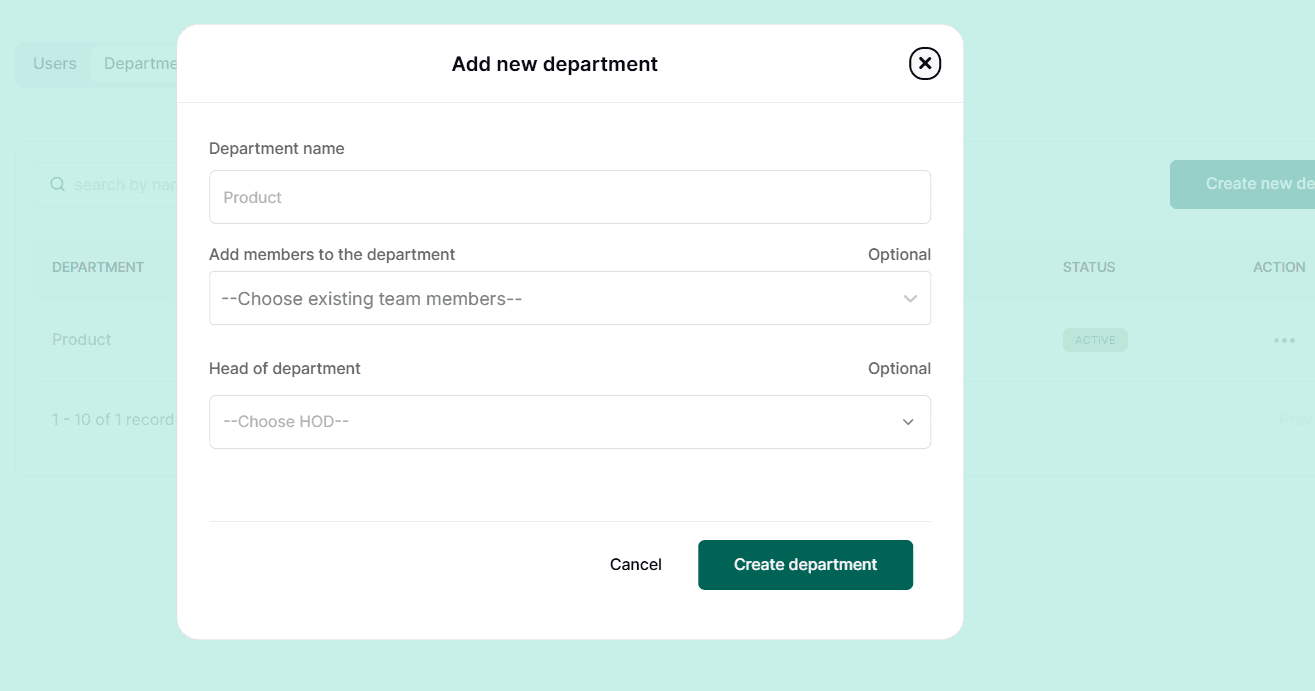
Click on “Create New Department” and a modal will show as shown below:
-
First, name your department. Then, add users to this department and assign a department head. If there are no users in the business yet, you can still create a department without adding users or assigning a head.
-
Once you have inputted the details on the page click “Create Department”
Note: You can also create a department when inviting a user. Learn how to add team members to a department.
Great job! You have successfully created a Department.
Was this article helpful?
Related articles
- How to add a new business or sub-locationAdd another business or a sub-location to your Duplo account.
- How to add team membersInvite your colleagues to your Duplo account and give them a role.
- How to assign an out-of-office approverChoose a team member to approve reports submitted to you while you're away.
Still need help?
Send a ticket to our support team and they will get back to you.